
How to sign-up for a Parent Teacher Conference at the Jr/Sr High School

From the website on a computer
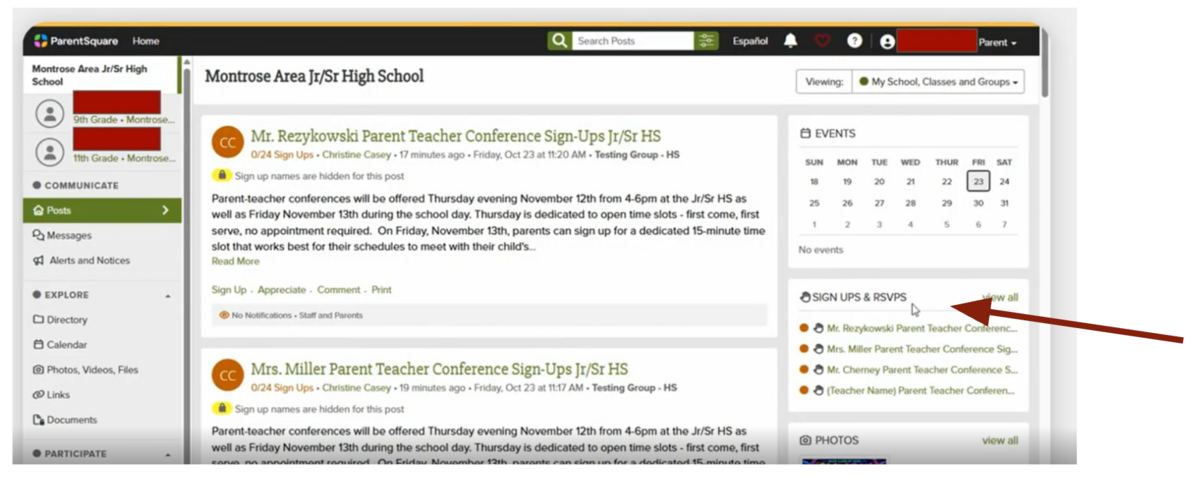
1) Navigate to the Montrose Area Jr/Sr High School
2) On the right hand side find Sign-Ups and RSVP’s
3) Choose ‘View All’
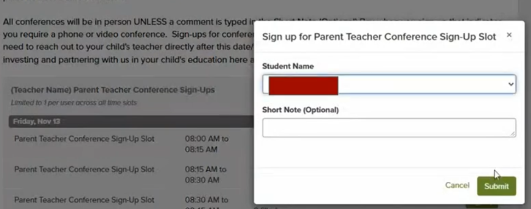
4) Select the time slot you would like
5) Select your student
6) If you need phone or video conference please indicate this in the Short Note Box. All conferences will be in-person unless there is information typed in this box indicating phone or video conference. Sign-Ups Open on November 4th at 3pm and close on Wednesday November 11th at 3pm
From the app on your phone
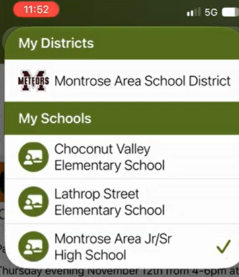
1) Navigate to the Montrose Area Jr/Sr High School
2) Select ‘More’ in bottom right
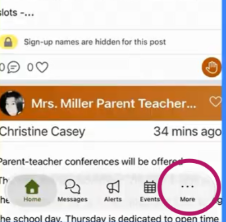
3) Select Sign-ups and RSVPs
4) Find the teacher you’d like to sign up for a conference with
5) Select the time slot you would like
6) Select your student
7) If you need phone or video conference please indicate this in the Short Note Box. All conferences will be in-person unless there is information typed in this box indicating phone or video conference.
Sign-Ups Open on November 4th at 3pm and close on Wednesday November 11th at 3pm